

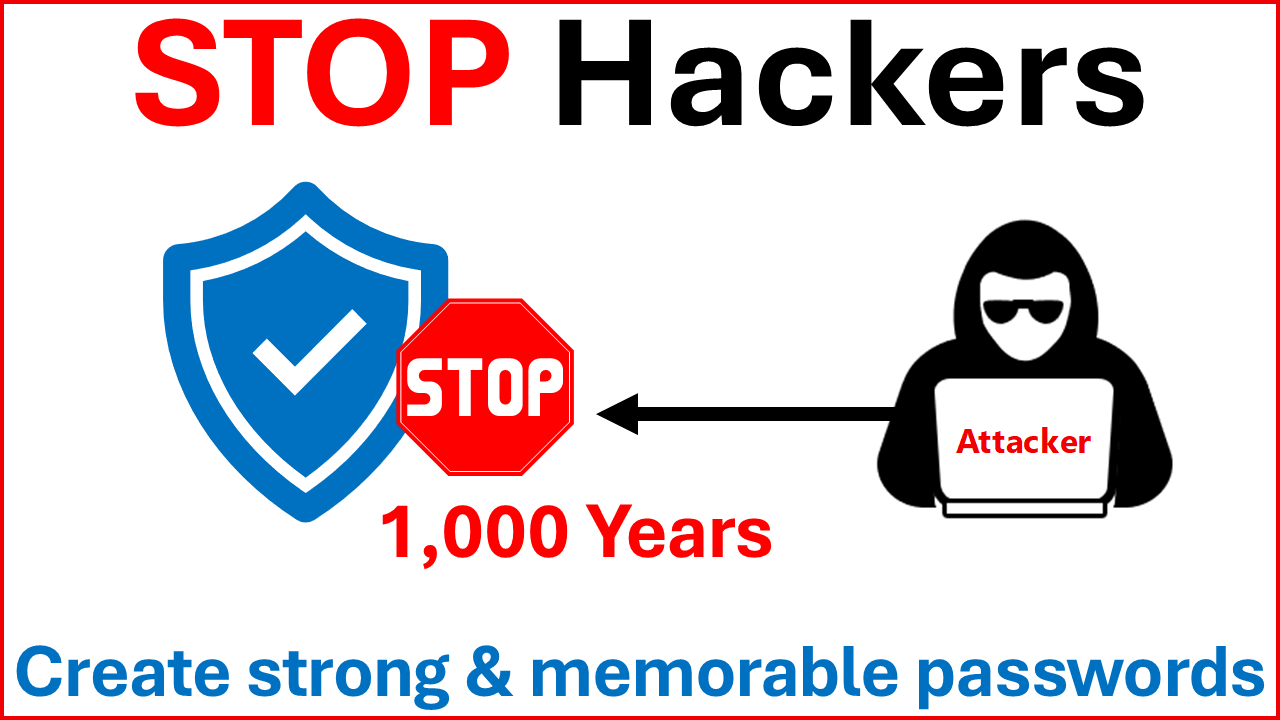
Create short, secure, and memorable passwords
In this YouTube video, we demonstrate a simple method for creating strong, unique passwords with 10–12 characters for every app and website you use—without using a password manager or writing anything down.
Author: bha created on 2026-03-03
Thank you
What makes a password strong?
A long password with 16 characters or more is mostly secure. You could use your favorite sentence as a password. While this method is safe, it is not practical to use different sentences for each provider.The video focuses on short passwords with 10 to 12 characters that are easy to remember and differ by design on the provider. You create a password rule that you can remember and add the provider part at the end, or in the middle as shown in the video.
Preparations for participating in the tutorial
First, create your provider list using the table below as a guide. This is intended to give you some ideas for the provider section.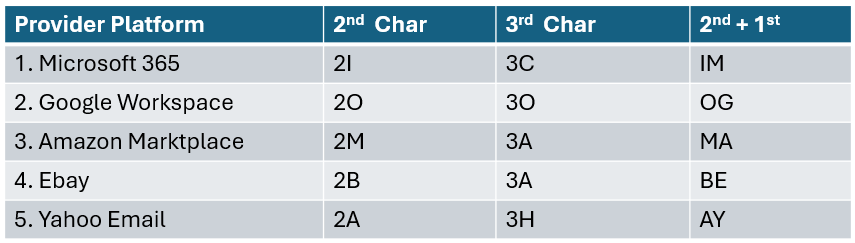
It is important to create a unique password for each provider. The reason why this is important will be explained later.
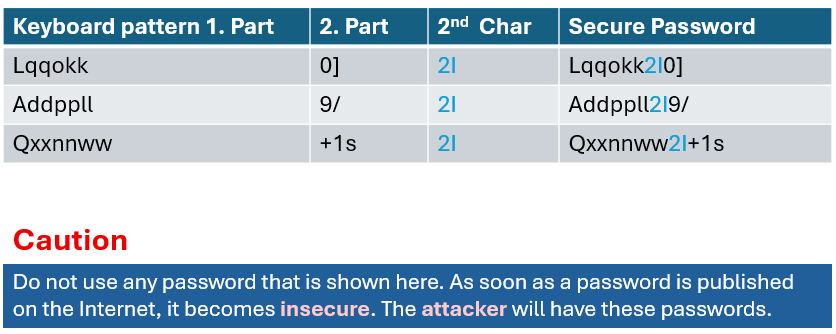
The video shows how you can create a secure password using a keyboard pattern. The passwords shown were generated to give you an idea of how you can create your other unique passwords.
AD-GPO password setting
Such password settings are often found at the customer's site. These GPO settings often also apply to Entra ID in a hybrid environment.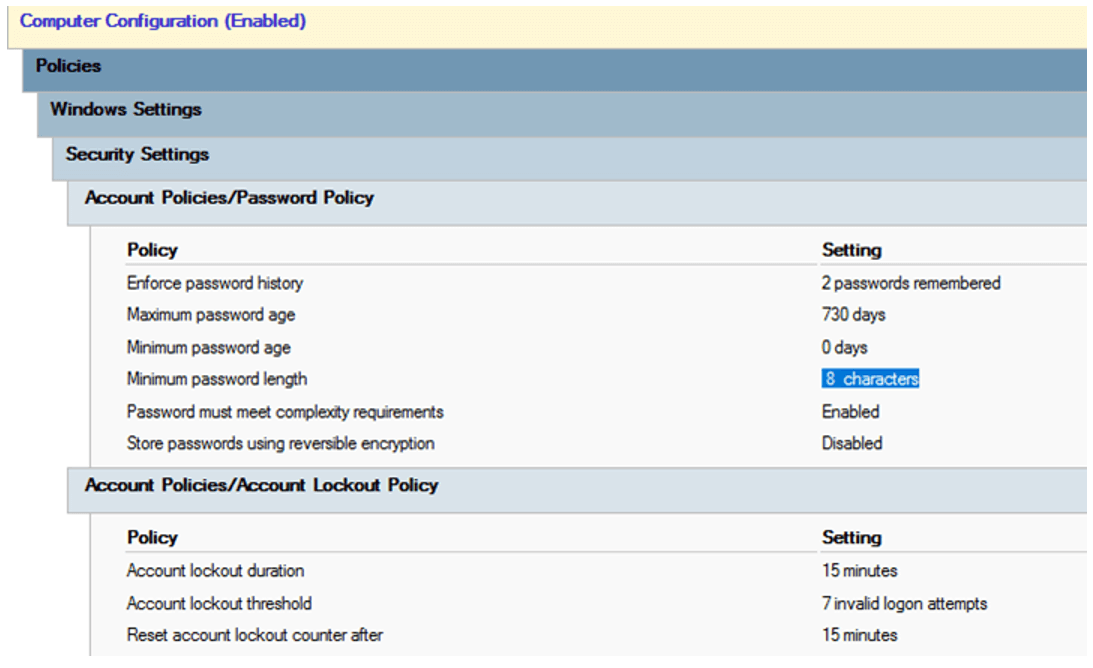
If you are the Admin of your company and have such setting, increase the password security. Increase the:
- Minimum password length
- Minimum password age
- Password history
Take a look at some examples of weak passwords that are valid for such GPO settings.
═══
═══
A hacker could crack such passwords within seconds.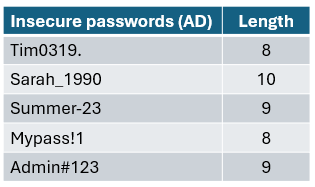
How can hackers crack your password?
An attacker could access the platform and steal the whole user database. This has already happened, and it happens every day.For example, in January 2026, there was a major breach involving 149 million stolen usernames and passwords from multiple providers.
See: google.com/search?q=breach+January+2026+149+Million+passwords.
In such cases, hackers would obtain usernames and password hashes. Then, they perform Offline Attack on the hash using Rule-Based Attacks:
- They take a list of common names (Tim, Sarah, Summer) or the entire dictionary
- Their software automatically adds common symbols and digits
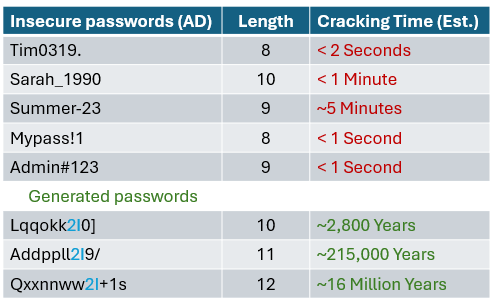
- The generated password Lqqokk2I0] does not contain a dictionary word or a birth year. The hacker's computer must guess every possible combination, which would take thousands of years
Hackers do not use the standard hardware that we use for everyday work. They use hardware optimized for their destructive work, like this:
- 8x NVIDIA RTX 5090 Offline Cracking Cluster
- Hardware: 8 high-end GPUs linked together
- Hash Rate: Approximately 100 billion to 500 billion guesses per second
- Energy Consumption: 3,000 – 4,000 Watts
The estimated results of the offline attack are listed below. The main reason for these huge differences between weak passwords and our generated passwords is that our generated passwords do not contain words from the dictionary or groups of numbers (dates or years).
How to protect your login data
The video explains why you cannot protect your username or email address.If you created your unique password using the keyboard pattern, you havve already done most of the work required to create secure passwords.
Be aware that your strong password can still be stolen through phishing attacks. Regarding phishing, never click on login links in emails. Open the website manually, then sign in.
If you have lost your password for an account, change it, even if you use MFA. You do not need to change any other passwords, as these are 100% different as hashes, even if they only differ by 1–2 characters.
The video ends with the following key message:
We all need to do more to improve security, even though it can never be 100% secure. Think about it: attackers want to achieve their goals with as little effort.
If breaking into your account or organization takes too much time or work, they are more likely to move on and look for an easier target.
Thank you for contacting us about this topic and M365 in general.
Modernes Arbeiten mit M365 & Azure?
☏ +49 721 66980 610
Write to us,
you can expect an answer on the same or next working day.
you can expect an answer on the same or next working day.
M365 & Azure expertise
✅ Microsoft 365 & Azure Support
✅ Hybridarbeit und Desksharing
✅ Homeoffice Arbeit und Security
✅ Hardware zur Zusammenarbeit
Expert Support for M365 & Azure
Receive direct access to certified Microsoft security experts at fair and transparent rates (75 - 95 EUR/hour). We can use your ticket system or our support Jira ServiceDesk, see sample ticket.

 Copyright 2003 - 2026 Sylbek Cloud Support
your resolution: , our time: 03:13:12